Monday, October 29, 2012

Convert your TRS-80 Color Computer MC-10 into something slightly better - with a Raspberry Pi

A friend and former colleague of mine recently dropped off a shiny new Raspberry Pi off to my desk. He had bought one for himself as well. Neither one of us had any idea of what to do with the thing. But I have always wanted to gut a classic piece of computing and stuff a new PC into the shell. This was a good opportunity to make use of a Color Computer MC-10 that's been in my basement for the past 10+ years.


The MC-10 was an attempt on the part of the Tandy Corporation (you know, the Radio Shack people) to compete with the success that was had by some other vendors who were cranking out cheaper and smaller computers like the (much more popular) Timex Sinclair. It was truly a worthless piece of shit. It shipped with 4K of RAM (16K was available as an expensive add-on accessory). It lacked a cartridge slot. So never mind playing "Dungeons of Daggerath" or plugging in a modem pack ... or a disk drive ... you get the idea. But in the late 80's and early 90's I was a kid attending an otherwise completely adult "Color Computer Club" where you could pop in monthly and hang out with some of the nerdiest and most socially awkward people you have ever had the displeasure of knowing. One of them owned one of these, and I envied it greatly.


When I found one in the box, with the power pack, booklet, and TV/Game switch, I had to buy it. And the price was right. Good Will charged me only $5.99 for what had previously sold for $119.95. So I bought it. Threw it into a pile in my basement, and forgot about it. Until now! I knew that once I got started, this poor thing would never be the same. Before I took a screwdriver to it, I hooked it up to a TV and showed my kids how a real man writes BASIC.

10 PRINT "DAD IS AWESOME";
20 GOTO 10
RUN

The kids were unimpressed. My son had the nerve to ask what else it could do. Kids these days. At that point, I split the case (voiding the warranty, I know). And here is what I found.


This thing was incredibly roomy inside. Or at least it would be with the circuit board removed. I laid my Raspberry Pi on the table to size things up. Looked possible. Next, I took a long look at the keyboard. Yeah, that's right, I wanted the keyboard to ACTUALLY WORK with my Pi.

I knew that this would be the toughest part of the job since I would be trying to recreate the functionality of a keyboard controller using GPIO pins on the Pi ... or something. I was hoping that the keyboard would be nothing more than a matrix keypad (regular old buttons in a columns and rows layout). The backing to the keyboard was a thick cardboard padding that could be removed with a couple of screws. I pulled it apart to expose the circuit traces.


Looked like a damned mess! I did some Googling and found that someone else had done a TRS-80 Model 100 Raspberry Pi conversion not too long ago. He had used a Teensy USB development board to turn a Matrix keypad into a USB keyboard. And it didn't look all that difficult. So I ordered a Teensy 2.0 (not the ++ model, just the regular $19 version).

While waiting for that to arrive, I pressed on. I had couple obstacles to tackle if I wanted this thing to actually be a USEFUL device. Namely, I needed to power this device - while providing additional USB ports. Oddly enough it looked like I could get away with powering the Pi from a USB hub ... while at the same time linking the Pi to the hub to provide additional ports. Here is what that scene looked like on my desk.


You will also see from that above picture that I was experimenting with how I would "map my ports" from the Pi to the MC-10 case. I have no intention of soldering to or otherwise bringing harm to my Pi. So any modifications would have to be done to my franken-MC-10. I started with extending the network by making a very short male to female cable and then glued the female end into the case. To give it some 'stature' I glued a small wooden block underneath of it. That also raised it to the correct height.

Once I knew that would work I got right to work at stripping away the plastic from the USB hub and giving it a home in the MC-10. It fit surprisingly well! Naturally there was nowhere for the ports to poke out of the back of the MC-10 so there was some Dremel work that had to be done. I suck at using rotary tools, so please excuse the crude cut-around work in these pictures. Also, the fun was cut short when my boss came back to my desk and said "what are you doing?? stop it!! that's loud ... and annoying!!".


I didn't want a bunch of cables running inside and outside of the case, which meant that I would have to make some modifications to the USB hub itself. Not a big deal really. I cut up an old USB A/B cable, and a micro-USB cable. I removed one of the USB ports from the hub with a desoldering wick and then hard-wired a micro-USB stump into it's place. This would power my Pi. I also soldered down a standard USB connector to make the bridge between the "B" port of the hub to the Pi. This actually makes the hub light up and become an additional three ports (originally four, but you know, one of those was pulled).


Being the master hardware modifier that I am (not) you can see that I used stacks of double-sided foam tape to lift the USB hub to the right height and to hold it down into my case. Here it is nicely mounted and connected into the case. Note that I later came along with hot glue and glued down some spots around the sides of the hub where you would be applying pressure when inserting a jump drive or something.


Another nice feature of using the USB hub is that it had a "self / bus" switch. This means you can use it like a powered hub with a power cable, or a non-powered without the cable. For my purposes it works like an on/off switch for my Pi! Neat! I could extend that switch to the side of the case? Nah.

A few days layer my Teensy USB arrived in the mail. The shipping was fast! I went right to work trying to get the keyboard working. And then spent the next couple of ... days ... figuring out what the hell I was doing. Step #1 was to connect the Teensy to a breadboard. The thick clear ribbon cable could then be aligned to pins really easily by just pushing them into the breadboard.


And then using the sample "Keypad.h" code that is readily available, I was able to start making keys do something!! But what was a column - and what was a row? I took a guess. Got it wrong. No problem, just reverse the pins I was using for each. But not all pins seemed to actually work. And after hours of non-progress I started researching.

 Unfortunately the MC-10 was never liked enough to be repaired. I imagine if it ever 'went bad' you simply threw it away instead of sending it off for an overpriced repair. Hell, I sent off a Color Computer 3 once for repair. It took two weeks and $80 to make it run again. At a cost of $119.95 for a new one ... well you get the idea. Being that there was no repair manual, I didn't have any technical reference guides to refer to.

I couldn't imagine that the keyboard for the MC-10 would be mapped like a standard Color Computer 2 or 3. This was a completely different sized keyboard, with LESS keys on it. But ... perhaps it would give me a start? So I tracked down a TRS-80 Technical Reference Manual on archive.org and drilled down to the keyboard schematic.

Would you believe that the key layout is nearly identical?


Over the next few days I used the Arduino development software - paired with the Teensy loader to write out a USB Keyboard routine using the above schematic as a rough reference for what letters and numbers fell into which columns and rows. The amazing thing about the layout is that it would have been FAR easier to create a schematic where "QWERTY" started off the first row, instead of "ABCDE". In other words, it's an alphabetical matrix ... with a wild run of paths around a printed circuit board to make it all work. Pretty neat.

I am sharing my code via PasteBin: http://pastebin.com/79gSmXy0

And for fun, here is a crappy screenshot from when I was demonstrating an early version of my code.


This is by no means a USEFUL keyboard. Still, I was impressed at how well it functions. I had a hard time getting multiple key presses to work (lot's of forum posts on this topic) ... and defining modifier keys was awkward. I have found some other efforts out on the web which handled this far more gracefully than I did.

Example: To make a capital letter, you would press the shift key once, and then press the letter. It works like a toggle key of sorts. But you also probably want a tab key. And a backspace key. And you know ... normal stuff like that. So hey, the keyboard is a work in progress. If I were to sit down and use this damned thing for more than 10 minutes ... I would probably plug in a REAL keyboard.

To finish things up ...

I removed the breadboard and did a hack soldering job to make the Teensy rig a little more permanent.  Although I did use a IC socket to solder to so that I could have my Teensy back for another project if I ever wanted to yank it out.

I remapped the composite video port to the lid of the case (the MC-10 had defined it as 'TO TV' and this still holds true).  And hey - I don't need that pesky TV/Game switch any more!

I installed a small internal speaker with an old audio cable, and what had been some cute little collectable character from Radio Shack that doubled as an external speaker.  He was on clearance for around four bucks.  I gave him a quick and painless death.

Some hot glue.  A couple strips of Velcro.  Oh, and an Airlink 101 ($11 from Amazon).  Boom!  It's complete!


Let me tell you, it's a tight squeeze, but this all fits back together very neatly, and without any of my parts rubbing together to cause me any trouble.

Now that I had my dream MC-10 ... what would I do with it?

I tried using the standard Debian Wheezy build from the Raspberry Pi site but I had some serious problems getting my Teensy keyboard to work correctly.  And yet when running any other distribution ... I didn't have any problems.  So I resorted to running the Arch distro for the Pi.

Once the OS was installed ... I added dosbox, and .... Kings Quest Part I.  Ah, here is something that my MC-10 could never do!  Run games for the Color Computer 3 with a 512k upgrade installed!  And yes, these games are the reason that I remapped the awkwardly placed arrow keys on my MC-10 keyboard.
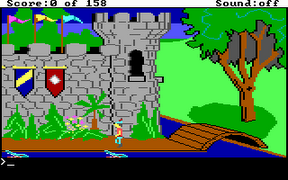

Now I just need my mom to come stand behind me and ask "is your homework all done?" and it will be just like the good old days.

Thursday, December 29, 2011

I STILL BLOG.

It's been ages, and I mean ages since I have blogged anything. Mostly because I have nothing to share that anyone would want to read. I have somehow managed to fill my days and nights cooking, cleaning, doing home improvement projects, and sleeping. As for spare time at work - I don't have any. I am too busy working. But as I am wrapping up work orders that I have had for months and my phone is not ringing, I am feeling a slight sigh of relief.

I suppose I could work on my Android projects, but they aren't really making me much money any more, and I have for the most part abandoned them. I had high hopes that PVault would do better in the MiKandi market. But after a few attempts to revitalize and update the app, I am not really seeing any reward from it. Some of the worst apps I have ever made still bring me the most money. And for the record, we are talking about a few cents a day. ;-)

I have been looking into streaming media players to replace my Wii as my primary Netflix device and it looks like I will probably be buying a Roku sometime soon. Yesterday I noticed that they have a development kit and it got me excited about the possibilities for building my own "channels" for streaming content. But I'm not sure I have the desire to run out and learn an entirely new language so that I can pay someone to stream my content to the masses - and then wonder if advertisers are ever going to pay me.

So hey, Ray is still alive and well. And he may (or may not) be thinking of new things to do with this site to justify the hosting fees.

Wednesday, November 24, 2010

Google Market Account Banned (Happy Thanksgiving)

Well, congratulations to all of you assholes who went through the trouble of downloading my applications only to flag them, and/or leave retarded comments such as "Flagged". I'm not sure why people feel the need to play policemen (or policewomen, or in the case of Cashelle, police-transexual), but consider yourselves a special breed of asshole and take this day to congratulate yourself between your bible readings, hating of gays, and watching recorded episodes of Fox and Friends on your DVR. THIS ... is YOUR day.

By the way ... you are aware that for $25, I can be right back at this? And I can easily make $40 a day in advertising revenue, per application. But hey, enjoy this moment. Because I am going to take some time off to enjoy the holiday and work on some all new and ultra-offensive applications - just to piss you off.

In the new year I will be working on getting some new applications on the MiKandi market (which allows mature content) and I will be restoring all of my old apps there to bring them back to life. Be sure to check out my stuff there.

In related news ... Google now has content ratings to ensure that you are targeting your applications to the right audience. The categories are "All", "Pre-teen", "Teen", and "Mature". That would indicate that you can create applications with mature content, right? Wrong! All the same guidelines apply that applied before. So if your application contains something to do with gambling, it should be rated mature. But only play-gambling. Not real gambling. And if your application deals with adult-ish content, it should be rated mature. Just make sure it has nothing to do with pornography, nudity, or ... anything sexual. Yeah. I don't get it either!

Look for an update here soon folks, and HAPPY THANKSGIVING TO ALL YOU TURKEYS!

Sunday, August 22, 2010

Dr. Zoidberg Soundboard


After creating my Professor soundboard and updating it several times I decided it was time to branch off and attempt to create a new soundboard using my existing design. With that, I created the long awaited Dr. Zoidberg soundboard for Droid phones.

If you are a Zoidberg fan (or even a Futurama fan) you need this on your phone.

Coming soon - Zapp Brannigan!

Saturday, August 07, 2010

Good News Everyone!


I have posted my first application to the Android Marketplace. The "Ultimate Professor Farnsworth Soundboard". I have spent countless hours pouring through Futurama episodes these past two days and then had to figure out how to package them up. You actually have to pay to publish apps to the Google Market and so I am asking for a very nominal fee of $.99 for it to recoup my 'investment'.

I actually still have a lot of episodes to go through so I plan on updating this one as well as putting out a few others (Bender, Zapp, and Zoidberg). In the meantime ... if you have a Droid phone ... get on over to the market and buy my app!

Sunday, July 18, 2010

Cracking the "DROID CODE"

Recently, the folks at Verizon/Droid started airing a new Droid X commercial featuring a couple of astronaut types exploring some sort of moon-like base. It's pretty creepy and cryptic - and it ends with an obvious clue around frame 0:59.
The code is "JXYDAQWQYD". Some clever folks over at Droid Life figured out that there is a place to put these codes on the droiddoes.com website. When you enter this code into the box, you get the "transmission log" from the astonauts. Pretty neat.

Is there more to the code itself? It seems like a really easy crypt of some sort so I got out some scrap paper and tried to reverse it. The code actually says "THINK AGAIN". And with that - I made a simple letter chart. What you will find is that the words that they chose to reveal the code actually leave letter gaps and made it VERY easy to crack. Here is a letter chart which you can use to perhaps crack "future codes".


I have to assume that there is more to the "secret page" so I started looking for additional clues. The page iteself drops some interesting word clues such as "Shaefer" (who must be the unfortunate astronaut whose cracked and damaged helmet they pass). And also some numbers in the form of an energy blast that passes the new crew (+240, +46, +0). It seems like GPS coordinates so I tried my luck at that and didn't get very far.

Google maps took me to a place in in the UK called "MotorSolve". I didn't think it was at all related. But the address of the place is 64 Cecil St. One of the astronauts in the commercial is wearing a helmet with his ID of "C-64" stamped on the side. This could be a far stretch. Perhaps I am conspiring too much. ;-) Also, I have been at this all morning and I need to shower now.

If anyone can find other codes that work - share your findings with me!

Tuesday, June 29, 2010

USB Serial Adapter Drivers for Chromium

A few weeks ago I downloaded Chromium OS Flow and tried it out on my netbook using a jump drive. I really liked it a lot, although the USB device was slow and had a tendency to stall out. So I pulled out an 8GB SDHC SD card that I had been hoarding and installed Chromium Flow to that. And all I can say is *WOW*. This OS is awesome. It boots (and shuts down) on a dime. The interface is quite slick. And it has a full screen terminal with apt-get and a lot of installable software.

But then I ran into a problem. Lately I have been resetting a lot of router passwords using a console cable (don't ask). To perform this technique, you need a serial port. No laptop or netbook made in the past ten years has a serial port on it so I usually get by with a USB to serial adapter (aka "a serial dongle"). We happen to have one at work, which was lucky. Except it didn't work at all in Chromium.

Long story short ...
1) I had to use gparted on a jump drive to resize some partitions. Chromium Flow is a 2GB "image". So I needed to move some boundaries to take advantage of all that empty space on my SD card.
2) I had to relocate /var/cache/apt. The tiny slice that the directory sits on didn't leave much room for installing software. I moved the directory to /, and then created a symbolic link to it.
3) I installed the build-essential and kernel source (2.6.31) packages.
4) I unzipped the kernel source, turned on all of the USB serial drivers as modules, and then built a kernel.
5) Now I have a little stack of kernel modules for a slew of USB to serial adapters.

I can load it with insmod ./pl2303.ko. If I do a dmesg | tail I can see that it loaded properly. Now when I plug in my dongle, it gets a serial device assignment whereas before all I got was a notice telling me that it was plugged in.

If you are in need of a USB serial adapter driver for Chromium flow, just use mine. This should save you a couple of hours. ;-) You can download the bundle of kernel modules here: http://www.oddree.com/rayhaque/usbserial.tgz

Tomorrow I can fire up minicom and start rocking out Cisco console ports with my little netbook and not have to drag around a 25 pound P.O.S. with Windows XP and Hyperterminal! Hooray!

** EDIT ***
I guess I should tell anyone who might download this how you should use it.
1) Get the file downloaded. From terminal ...
wget http://www.oddree.com/rayhaque/usbserial.tgz
2) Untar/zgip it...
tar -xzvf usbserial.tgz
3) Move the directory into the right place alongside your other kernel modules ...
mv usbserial /lib/modules/2.6.31-4-intel-menlow/kernel/drivers/usb
4) Change to that directory and optionally rename it to what it would normally be...
cd /lib/modules/2.6.31-4-intel-menlow/kernel/drivers/usb/usbserial && move usbserial serial
5) Make the kernel aware that there are new modules out there ...
depmod -a
6) Now, load your module. If you were using the same one as me ...
modprobe pl2303
7) Check the dmesg output for clues as to whether or not the driver is working ...
dmesg

ENJOY! :-)

Wednesday, March 31, 2010

"Too long WEP key" Problem Resolved?

I know many of you using IZ2S have had trouble with getting your Zipit to accept a 128-bit WEP key in hexadecimal format (26 characters).

I may have traced the problem to the use of double quotation marks in the configuration file. It seems that wpa_supplicant assumes that if you are wrapping your key in quotation marks, then it must be ASCII.

I have made some changes to the wifi script which will now ask the user if they are inputting a Hexadecimal or ASCII key. Ideally it would be nice to have the Zipit figure this out on it's own and not even have to ask the user. But I am providing a quick fix for those of you have been struggling with this.

First, you will want to get the latest version of IZ2S which at present is the BETA. If you are all ready running the BETA, don't re-download it. It's unchanged.

http://www.oddree.com/zipit/Z2S-v205-BETA.zip

Then, you will want to grab this new script ...

http://www.oddree.com/zipit/setup-wifi.sh

Put it in /mnt/sd0/bin or the "bin folder" of your SD card. You can replace or overwrite the current file. Then, reboot and choose yes when asked if you want to change your wireless settings. You should get a new question after choosing WEP. If you have a long 26 character key, you should choose "H)exadecimal".

Please post your success and failures to me in the comments area. I can't do much testing here without reconfiguring my own access point (and my wife wouldn't appreciate that too much because she is using it).

Also - sorry for the absence lately. I hope to be back to developing soon!

Friday, February 26, 2010

All New Zipit Z2 Development Kit Released

A while back I had released a virtual machine that included tools that would help folks build software for the Zipit Z2. It was thrown together rather hastily and it became frustrating to anyone who downloaded and tried to use it. Releasing a new version with some fixes include - was long overdue.

You can get the new image here: Zipit Z2 Development V2.torrent
Or here: http://thepiratebay.org/torrent/5392949/Zipit_Z2_Development_V2

NOTE: The seeding is not going as well as I had hoped on this torrent. If you are able, you should forward a port on your firewall/router for your bit-torrent client to use. That will allow you to download from a connection I have set up which is seeding at 300k. Also - if any of you would rather just get a copy of this development kit by mail, I am going to offer that service to you. I will send a disc to anyone in the US for a flat fee of $10. That should cover materials, postage, etc. Just PayPal $10 to donations AT oddree.com. If you would like a copy and you are outside of the US, please email me (ray AT oddree.com) and we can try and work something out. I see there are some Swede's in my seeds. :-)

The release notes are below, but here is a quick rundown ... This was built for VirtualBox and the guest edition tools are all ready installed. Instead of trying to share raw files again (sorry about that) this is being shared as an "exported appliance". Which means you could also use this with VMWare if you wanted to. Also, because buildroot has proven useful in a few areas involving kernel modules, I have included that too.

It's been suggested that I include a few pre-built packages. But not knowing what people will really use this for, I didn't want to "muddy the waters" of an otherwise clean build environment. Rather, I will build some packages of my choosing and then perhaps find a way to share those in a way that you can drop them into your VirtualBox (if anyone is interested?).

If you are having trouble using this, or if you have questions etc. drop me a comment to this post. You can email me too at ray AT oddree.com, but leaving comments is preferable if it's something others might benefit from reading.

RELEASE NOTES:
ABOUT
This is version 2 of the Zipit Z2 Development kit. You can use this kit to compile your own software for use on the Zipit Z2 from Zipit Wireless.

Included is a virtual appliance exported out of VirtualBox v3.1.4. This image should also work with VMWare. However, if you are using VMWare you will need to install the guest tools and possibly remove the included guest tools for VirtualBox.

The image includes a configured and ready-to-use Scratchbox environment and also a buildroot environment that includes a patched Z2 kernel and ALSA (thanks again, GPSFan).

INSTALLATION
Download and install VirtualBox from http://www.virtualbox.org. Click File > Import Appliance and then point to this torrent. Adjust your memory as you see fit (256MB is about as low as you should go - 1GB+ is probably overkill).

After booting up for the first time, you should be auto-logged on as "zipit". This users password is "password" (without the quotes). Note that the root password is also "password" and so you should change those if you are going to attach this device to a network!

MORE INFO
For more information - see the README.txt file on the Desktop of the virtual appliance, and the README.txt in the root of the Scratchbox home directory.

Check out www.oddree.com for more details and post-release notes and linux.zipitwireless.com for more on the Z2 device.

Hack on!
-Ray Dios Haque
February 2010

Thursday, February 04, 2010

Version 2.04 IZ2S Release

You can download IZ2S v2.04 here: http://www.oddree.com/zipit/Z2S-v204.zip

I had originally called this version the "Christmas release". But somehow it ended up being February and I still hadn't done anything new with it. Thanks to the hard work of some other folks, there are some grand changes with this release. In fact, I had little to do with these improvements.

Wicknix has given us the long awaited bash shell. He also gave us a configuration file for links which turns it into a much more usable browser. With the font and pictures scaled down, it's about like surfing the net with a cell phone.

rkdavis has provided an all new busybox binary which includes all the stuff that was left out in the original Zipit Wireless shell. If you are curious and do some digging around you will see that we have a strange way of handling that with the logon script. Basically there is a symbolic link for nearly every command which busybox offers.

Most of the stuff I added to this release will go unnoticed. I rebuilt a few packages, consolidated some things, etc. Some other nice additions include: A new build of centerim which supports ALL IM protocols, the nano editor, the midnight commander file manager, curl, and even a "mostly functional" release of tcpdump!

I plan on the next release being very different. I'm going to take everything I have learned and apply it to a clean installation. That is, I am going to take the original stock shell and begin building the additional packages all over again. This will give me an opportunity to use shared libraries for everything, and loose some of the "bulk" of IZ2S. I'm not sure when that will get released. It may not be for a while. Work is hell right now, and I have a car parked outside begging for my attention.

Also rkdavis seems to be very close to having backlight and keyboard backlight controls working. Hopefully he has that working in time for "IZ2S v3.0". ;-)

Here are the release notes for IZ2S v2.04 ...

IZS - The "Improved Z2 Shell" (aka Shell with Benefits) v2.04

ABOUT
This collection was built by Ray Dios Haque out of sheer necessity. I wanted something that I could play with that would not effect the stock software that comes on the Z2. The easiest way to do that was to take the Z2 Shell that was built by rossimo from Zipit Wireless and expand upon it. I take no credit for the work of the Zipit community. If I don't claim to have built it - it's because I didn't. Thanks to all of you for your contributions over the years. I hope you enjoy my additions!

INSTALL (borrowed from the original README)
Format your SD card as a FAT or a FAT16 file system. Copy everything from this zip file onto the root of the card (preserving all paths/directories). Insert your SD card into the Zipit and boot it up. Note that you can only boot this image if you are running the Stock OS that came with your Zipit. If you have installed OpenEmbedded or Debian, then you have probably replaced the stock operating system which included a routine to look for the z2script.sh script. For legal purposes, I cannot provide you this stock operating system. Some of the smarter people in the Zipit community might be able to help you restore this OS (see CHAT below).

CHAT
Come chat with us! There is a thriving (?) community of the worlds best Zipit hackers who hang out in #zipit on irc.freenode.net. You can fire up 'irc' from this very image and come hang out.

CHANGES/ADDITIONS
RELEASE 2.04 (ALL NEW!) - Christmas 2009
bash (by wicknix, then rebuilt by ray), ~/.bashrc (provides defaults to bash), ~/.links/html.cfg (by wicknix, makes graphical links fit the screen better), centerim-4.22.9 (supports ALL protocols), tcpdump, nano, mc (midnight commander), zip, NEW busybox v1.15.3 (built by rkdavis), curl.

RELEASE 2.03 - Early December 2009
We have sound!! Thanks GPSFan! (alsaconf, alsamixer, alsactl, amidi, aplay, gawk, getopt, iecset), SHARED Library support (ldd, ldconfig, readelf), cmus (a wicked MP3 Player), matrix (ncmatrix), mpg123, mplayer-10rc2, ntpdate, gzip (gzip, gunzip, gzexe, zcat, zcmp, zdiff, zegrep, zforce, zless, zmore, znew), zz (script to run after ssh'ing in - use . zz (dot space zz))

RELEASE 2.02 - November 2009
cls (clear screen), centerim (ncurses instant messenger with AIM, Yahoo, ICQ support), irssi (ncurses irc client), links (ncurses), links2 (graphical browser!), sed (for scripting), tar, bzip2 (bzip2, bz2recover), coreutils (10MB's of binaries)

RELEASE 2.01 - Initial Release
wget, ircii-20090520 (irc), wireless-tools (ifrename, iwconfig, iwevent, iwgetid, iwlist, iwpriv, iwspy), ftp (ftp, /etc/services), unzip (unzipsfx, unzip, funzip), nmap (nmap, *new* ncat), wpa_passphrase, less (lessecho, lesskey), grep

LIBS CHANGES
Removed the worthless ncurses static libs to make way for all of the *shared* libs. Not listing all of them here. Just look for yourself.

STARTUP SCRIPT MODIFICATION(S)
REV 2.04
- Removed the "motd" from this script, since .bashrc displays it now.
- Removed coreutils, as the new busybox does almost all the same things with less space.
- Added a symbolic link script to support all of the additional commands that busybox provides.
- We now use your actual MAC address if available from /mnt/ffs/properties.txt (thanks rkdavis).
REV 2.03
- Stopped audio_pxa from loading, and then run /mnt/sd0/modules/alsa/loadsound.sh for ALSA sound modules.
- Added ntp protocol to /etc/services file.
- Added a line which will fix the time and date if there is a network connection available, and then display that time/date to you.
- From here on out, all libs will go into /mnt/sd0/lib which will be linked to both /lib and /usr/lib/.
- Hid all the gory details of wpa_supplicant, while adding some other stuff for verbosity.
REV 2.02
- Modified the PATH statement so that coreutils and /mnt/sd0/bin binaries will override the busybox stuff.
- Created a home directory for the root user which exists on the SD card. It holds your stuff.
- Added a routine that change your MAC address to something random the first time you boot up. This should prevent duplicate MAC problems if you own multiple Z2 devices.
- Added a /var directory that exists on your SD card. Some things (like dropbear) expect to find it. Had to fix a script error in the BETA (thanks rkdavis).
- Added an /etc/issue file which is displayed at logon time and to ssh connections.
REV 2.01
- Added a routine asking if you would like to configure your wireless card. This was not possible before as there was no scanning routine and the image lacked the wpa_passphrase utility. You can now scan for and configure your wireless settings entirely from the zipit (wording updated in 2.02).
- Added "cp /mnt/sd0/etc/services /etc/services" which gives the ftp command the port numbers it needs to function.
- Added "cp -R /mnt/sd0/etc/terminfo /etc", "export TERM=vt102", "export TERMINFO=/etc/terminfo" to help irc understand the screen layout.
- Added "ln -s /mnt/sd0/lib/* /lib" to make ncurses libraries usable, and any future libraries that you or I might add.
- Added "ln -s /mnt/sd0/share /share" for nmap and anything else that might require a "share" directory to be present to function.

OTHER MODIFICATION(S)
- Replaced the stock keyboard driver in /modules with one that was created by GPSFan (Ken) from the Zipit Yahoo Group. This removed all of the problems with keys not working, or repeating while typing. The original drivers remain, but have been renamed to *.orig.

COMING SOON?
- An *easier to use* mp3 player alternative to cmus (most require network socket support, which the Z2 kernel does not support).
- A script to download and install "packages" (zip files) using wget, unzip, and a "binary repository" on www.oddree.com. A similar system could provide updates when I provide them. I have not worked on this at all. Sorry about that.

IFAQ (InFrequently Asked Questions)
Q. Why are you wasting your time on this? The Z2 Shell is dead!
A. It may be 10x more work to get simple things built for it - the Z2 is very lean, and still very useful.

Q. How can I add my own binary/package?
A. There are several ways to go about this. The method I have used to compile everything is "scratchbox". Scratchbox is a program which let's you cross-compile applications. That means that you can build stuff for an ARM platform, even though you have a regular x86 machine. It can be tricky and complicated. Try reading up on what I have posted at http://www.oddree.com.

Q. Why did you *insert snarky comment here*?
A. If you find that I did something stupid and inefficient, do let me know. I don't claim to have any expertise in the area of building software. If you have some suggestions on how to improve things or would like to help with the next release of this improved Z2 Shell, email me at ray@oddree.com. I would love to collaborate with some folks who might be more talented than myself.

Q. Will you build *insert package name here* for me?
A. Probably. Unless you are asking me to build something that has an endless list of dependencies. In which case I will probably tell you to install OpenEmbedded or full fledged Debian. They all ready have all of these packages. I am only expanding upon the old Z2 Shell because I find it lean and useful.

Sunday, January 24, 2010

Still Alive!

I just wanted to drop a few lines and assure everyone that I am still very well alive. A couple weeks ago now I was putting the finishing touches on the next release of IZ2S when all hell broke loose just about everywhere. It's been a very, very, busy past couple of weeks at work. I have been battling new projects, old projects, phones ringing off the hook, upgrades gone sour, lost support, you get the idea.

Meanwhile, my car has been acting up. I have had some trouble getting the old VW started lately so I replaced the battery. That seemed to work for a day or two, and then I was right back to same issue. And so last weekend I replaced the starter. Let me tell you, this was NOT an easy task. In the process of working on the starter it appeared that I was leaking something. Oil? Gas? Of course I was laying in the wet street and I had some dirty old compacted snow stuck to my underbody. Once everything had dried out, it looked like I was in good shape.

A day or two later I was barreling down the road when my green dash light came on. Suspecting *another* electrical problem I got out the old multimeter and began testing my voltages. It appeared that my generator was putting out enough juice, and my battery was getting charged. Perhaps my voltage regulator was allowing too much juice through? I was getting about 17v to the battery, and that didn't seem right. Then as I was leaving work on Thursday my engine just stopped. And I mean, it stopped HARD.

That's when I realized that the green light on my dash wasn't an electrical problem at all. It was the "low oil" light. I did have a leak! I have seized my engine. Could this week get any better?

I tried a few quick fixes to try and get the car home, but I ended up having to pull out my AAA card and get it towed to my house. And now, I just wish it would stop raining long enough that I can pull my engine and get it into my basement. Of course, I will be doing all this while laying in the gutter on a busy public street because I don't even have a driveway for my house (let alone a cozy garage to work in).

So anyway, I am alive. And I miss developing for my Zipit. I hope to be able to get back to it soon.

Wednesday, December 16, 2009

Restoring your Zipit Z2 to Defaults

A while back I bought my daughter a Z2 for Christmas. We got it off of eBay and my wife asked that I test it to make sure it works. About ten minutes later I realized that I had registered the device with Zipit Wireless using a nickname of my choosing. In effect, I just made this Zipit my own. But what if I wanted to "gift" this Zipit or sell it?

Quite simply, all you need to do to make a Zipit Z2 new again is to remove a few configuration files. You can do this using either my IZ2S, or even the vanilla Z2 Shell.

Boot up with your shell, and then do a "cd /mnt/ffs" and an "ls" to list the files there. You will see something like this ...

-rwxr-xr-x 1 root root 657 Dec 16 01:58 411.xml
-rwxr-xr-x 1 root root 112342 Dec 16 01:58 NeonGlow.jpg
-rwxr-xr-x 1 root root 1519952 Dec 16 01:58 Resources.arl
-rwxr-xr-x 1 root root 3578680 Dec 16 01:58 Zipit2
-rwxr-xr-x 1 root root 1921 Dec 16 01:58 properties.txt
-rwxr-xr-x 1 root root 4644 Dec 16 01:58 serversettings.xml
-rwxr-xr-x 1 root root 4644 Dec 16 01:58 serverstationz.xml
-rwxr-xr-x 1 root root 510 Dec 16 01:58 start.sh
drwxr-xr-x 2 root root 4096 Dec 16 01:58 wpa_supplicant


Only a few of these files are really required, and the rest are files that get downloaded from Zipit Wireless when your Z2 connects up to their servers through the wireless network.

You can safely remove these files:
NeonGlow.jpg - This is my chosen background wallpaper. Whatever you picked will have a .jpg extension. You can delete any .jpg file here.
properties.txt - This file contains your device ID (serial number), your username, and some other important settings. Deleting this file removes your Zipit Wireless account association.
serversettings.xml - This file contains a record of your messaging limit(s), your chosen wallpaper, and some radio station data.
serverstationz.xml - This file seems to contain the same data as "serversettings.xml". Both files can be deleted and would be recreated when you connect with your Zipit Wireless account.

DO NOT REMOVE (or alter) THESE FILES!
Resources.arl - This is some sort of archive which likely contains data for your theme. Although it's compressed, and I don't know how. Leave it alone.
Zipit2 - This is the core application for the Z2. Do not alter this file, or your Z2 will no longer be any fun.
start.sh - This short and simple script is what allows for you to run a shell, as it looks for an OS on your SD card at boot time. It also runs the Zipit2 application. Leave this alone!
wpa_supplicant - This directory contains an executable of the same name. This is what connects the Z2 to your wireless network. Leave this alone too!

Just to recap ...
If you want to make your Zipit "new again", you should delete your settings files so that your /mnt/ffs directory looks something like this ...

-rwxr-xr-x 1 root root 1519952 Jan 1 1970 Resources.arl
-rwxr-xr-x 1 root root 3578680 Jan 1 1970 Zipit2
-rwxr-xr-x 1 root root 510 Sep 17 2007 start.sh
drwxrwxr-x 2 root root 0 Sep 17 2007 wpa_supplicant


The next time you boot your Z2 (without the SD card inserted) you will get the "first time wizard". By the way, in case you forgot - one of your options in this wizard is to enter the credentials for your existing account.

Tuesday, December 15, 2009

Links2 (Graphical Web Browser) for the Zipit Z2

This is links2 compiled along with directfb to provide a graphical web browser to the Zipit Z2 Shell.

You can download it here: http://oddree.com/zipit/links2-zipitz2.zip

Note that if you get the latest IZ2S image from this site - you will not need this program because it is all ready included by default. This is just provided for folks who want to experiment with the Z2 Shell in it's unadulterated, and naked form.


Here is the included README ...
** Links2 built with graphical directfb support **
** for the Zipit Z2 Wireless device **
** by Ray Dios Haque **

ABOUT
This is links2 built with graphical support for
all of the popular image types (png, jpeg, gif).
It utilizes directfb as a graphical driver, and so
there is no need for X11! This tooks weeks to get
running correctly. So I hope you enjoy it. :-)

Remember - this is a very basic web browser. While
you can do fun things like read blogs and check your
email, watching videos and running Flash is just out
of the question!

INSTALL
Copy everything in the bin folder, to the bin folder
on your SD card. That's it. Keep in mind that this
package is now part of the "Improved Z2 Shell" which
is available from www.oddree.com.

USING LINKS2
To start links2 in graphical mode, just run 'links2'
inside of terminal. This will actually run a script
which launches links2 along with some special and
required parameters (such as the screen rotator).

To visit a web page, press the letter "g" and then
enter a URL. To move around on the page, you can
hold down ALT and SHIFT (white up arrow next to ALT)
and then use your arrow/navigational keys to move
around the page. When running links, you are using
a special keymap that aliosa27 created. When you
exit links, your original keymap is reloaded.

NOTE: You can still run links in text mode, simply
by running 'links' (without the 2).

ALSA driver and utilities for the Zipit Z2

A little more than a year ago, our friend GPSFan was able to get ALSA sound and it's utilities running on the Zipit Z2. This was quite an accomplishment, as it meant that you could now use all sorts of other programs that rely on ALSA sound. However, the tools could not run on the stock Z2 Shell because they were not built "statically". And so - I made it my personal mission to rebuild these tools in a static form and give the Z2 Shell the sound it deserved.

It took many late nights (and some serious help from GPSFan) but I was eventually able to recreate the environment that GPSFan used to create his modules, and then change it slightly to get things compiled in a static form. Then it was just a matter of getting the tools to cooperate with the Z2. There are quite a few tricks involved in loading things properly, and so I wrote an included script which does everything.

You can download it here: http://www.oddree.com/zipit/alsa-zipitz2.zip

Note that if you get the latest IZ2S image from this site - you will not need these drivers because they are all ready included and loaded by default. This is just provided for folks who want to experiment with the Z2 Shell in it's unadulterated, and naked form.

Here is the included README notes:
ABOUT
alsa-lib/utils-20091113 (snapshot) built for the
Zipit Z2 Shell by Ray Dios Haque on 11/24/2009.

These tools should allow you to use GPSFan's
Z2_Rec modules (playback/recording) on the Z2
Shell, or Rays's Improved Z2 Shell (IZ2S).

More information available on: oddree.com.

For information on how the modules were built,
please see ./orig-notes/readme.

INSTALL
There is a lot going on with this script, and I
wanted to keep it really simple for the purpose
of testing or simply screwing around with your
Zipit. Note that if you are running this every
time you boot your zipit, this is probably a
pretty bad practice and you should consider
giving all of these items a permanent home on
your Z2. Or - just get the latest version of
Ray's Improved Z2 Shell from oddree.com which
will include all of this stuff.

That said, simply run ./loadsound.sh from this
directory to install and activate sound.

The script will remove the native sound driver,
create a few new directories for configuration
files, copy over the needed configuration files,
insert modules into your running system, and
finally will run a command to load up the sound
state from a successful instance of ALSA.

You will need to copy everything in the bin
directory to the bin folder on your SD card.

Now you can play your MP3's. In fact, I have
included a build of mpg123 in the bin directory.

Adjust volume and other things with alsamixer.

THANKS
Many, many, thanks to my friends GPSFan and
rkdavis from #zipit on irc.freenode.net. We put
in a few late nights to get this going.

Saturday, December 05, 2009

Version 2.03 IZ2S Release - SOUND and SHARED LIBRARIES!

I am probably more excited about this release than any other, because it has opened up the possibilities for some things that just weren't possible before. We now have the ability to run applications using shared libraries. And the first application I decided to port over was "cmus". Cmus is a "small and fast text mode music player" which runs in a console. It's been built to support wav's, mp3's, and even vorbis ogg files. And best of all, it can play streams (that means streaming radio!).

This represents a lot of work on the part of myself, and my friends from #zipit on irc.freenode.net. GPSFan was nice enough to share some of his dark secrets with me pertaining to buildroot and ALSA. From there I was able to get the ALSA-utils built, and then rebuilt statically.

You can download version v2.03 here: http://www.oddree.com/zipit/Z2S-v203.zip

Here is a quick video demonstration of the new feature(s):


As always - here is the README file which is also included in the Zip file.

IZS - The "Improved Z2 Shell" (aka Shell with Benefits) v2.03

ABOUT
This collection was built by Ray Dios Haque out of sheer necessity. I wanted something that I could play with that would not effect the stock software that comes on the Z2. The easiest way to do that was to take the Z2 Shell that was built by rossimo from Zipit Wireless and expand upon it. I take no credit for the work of the Zipit community. If I don't claim to have built it - it's because I didn't. Thanks to all of you for your contributions over the years. I hope you enjoy my additions!

INSTALL (borrowed from the original README)
Format your SD card as a FAT or a FAT16 file system. Copy everything from this zip file onto the root of the card (preserving all paths/directories). Insert your SD card into the Zipit and boot it up. Note that you can only boot this image if you are running the Stock OS that came with your Zipit. If you have installed OpenEmbedded or Debian, then you have probably replaced the stock operating system which included a routine to look for the z2script.sh script. For legal purposes, I cannot provide you this stock operating system. Some of the smarter people in the Zipit community might be able to help you restore this OS (see CHAT below).

CHAT
Come chat with us! There is a thriving (?) community of the worlds best Zipit hackers who hang out in #zipit on irc.freenode.net. You can fire up 'irc' from this very image and come hang out.

CHANGES/ADDITIONS
RELEASE 2.03 (ALL NEW!) - December 2009
We have sound!! Thanks GPSFan! (alsaconf, alsamixer, alsactl, amidi, aplay, gawk, getopt, iecset), SHARED Library support (ldd, ldconfig, readelf), cmus (a wicked MP3 Player), matrix (ncmatrix), mpg123, mplayer-10rc2, ntpdate, gzip (gzip, gunzip, gzexe, zcat, zcmp, zdiff, zegrep, zforce, zless, zmore, znew), zz (script to run after ssh'ing in - use . zz (dot space zz))

RELEASE 2.02 - November 2009
cls (clear screen), centerim (ncurses instant messenger with AIM, Yahoo, ICQ support), irssi (ncurses irc client), links (ncurses), links2 (graphical browser!), sed (for scripting), tar, bzip2 (bzip2, bz2recover), coreutils (10MB's of binaries)

RELEASE 2.01 - Initial Release
wget, ircii-20090520 (irc), wireless-tools (ifrename, iwconfig, iwevent, iwgetid, iwlist, iwpriv, iwspy), ftp (ftp, /etc/services), unzip (unzipsfx, unzip, funzip), nmap (nmap, *new* ncat), wpa_passphrase, less (lessecho, lesskey), grep

LIBS CHANGES
Removed the worthless ncurses static libs to make way for all of the *shared* libs. Not listing all of them here. Just look for yourself.

STARTUP SCRIPT MODIFICATION(S)
REV 2.03
- Stopped audio_pxa from loading, and then run /mnt/sd0/modules/alsa/loadsound.sh for ALSA sound modules.
- Added ntp protocol to /etc/services file.
- Added a line which will fix the time and date if there is a network connection available, and then display that time/date to you.
- From here on out, all libs will go into /mnt/sd0/lib which will be linked to both /lib and /usr/lib/.
- Hid all the gory details of wpa_supplicant, while adding some other stuff for verbosity.
REV 2.02
- Modified the PATH statement so that coreutils and /mnt/sd0/bin binaries will override the busybox stuff.
- Created a home directory for the root user which exists on the SD card. It holds your stuff.
- Added a routine that change your MAC address to something random the first time you boot up. This should prevent duplicate MAC problems if you own multiple Z2 devices.
- Added a /var directory that exists on your SD card. Some things (like dropbear) expect to find it. Had to fix a script error in the BETA (thanks rkdavis).
- Added an /etc/issue file which is displayed at logon time and to ssh connections.
REV 2.01
- Added a routine asking if you would like to configure your wireless card. This was not possible before as there was no scanning routine and the image lacked the wpa_passphrase utility. You can now scan for and configure your wireless settings entirely from the zipit (wording updated in 2.02).
- Added "cp /mnt/sd0/etc/services /etc/services" which gives the ftp command the port numbers it needs to function.
- Added "cp -R /mnt/sd0/etc/terminfo /etc", "export TERM=vt102", "export TERMINFO=/etc/terminfo" to help irc understand the screen layout.
- Added "ln -s /mnt/sd0/lib/* /lib" to make ncurses libraries usable, and any future libraries that you or I might add.
- Added "ln -s /mnt/sd0/share /share" for nmap and anything else that might require a "share" directory to be present to function.

OTHER MODIFICATION(S)
- Replaced the stock keyboard driver in /modules with one that was created by GPSFan (Ken) from the Zipit Yahoo Group. This removed all of the problems with keys not working, or repeating while typing. The original drivers remain, but have been renamed to *.orig.

COMING SOON?
- A better mp3player or a front-end for mpg123.
- A script to download and install "packages" (zip files) using wget, unzip, and a "binary repository" on www.oddree.com. A similar system could provide updates when I provide them.
- I still want to get an image viewer working. DFBSee 'almost' works.

IFAQ (InFrequently Asked Questions)
Q. Why are you wasting your time on this? The Z2 Shell is dead!
A. It may be 10x more work to get simple things built for it - the Z2 is very lean, and still very useful.

Q. Why does nmap (or some other binary) run so slow?
A. Because everything has to be built "static" to run on the Z2. That means that where you might normally have hundreds of shared libraries on a linux machine, the Z2 Shell must embed the libraries into each running binary. It makes for some bloated inefficient stuff. But, it works. If you want a better system - start writing it! Otherwise, try to limit the actions of what you are doing. For instance, use an address range or port range with nmap. Don't start long running scans on entire networks. This is a Z2 we're talking about. The resources are pretty lean.

Q. How can I add my own binary/package?
A. There are several ways to go about this. The method I have used to compile everything is "scratchbox". Scratchbox is a program which let's you cross-compile applications. That means that you can build stuff for an ARM platform, even though you have a regular x86 machine. It can be tricky and complicated. Try reading up on what I have posted at http://www.oddree.com.

Q. Why did you *insert snarky comment here*?
A. If you find that I did something stupid and inefficient, do let me know. I don't claim to have any expertise in the area of building software. If you have some suggestions on how to improve things or would like to help with the next release of this improved Z2 Shell, email me at ray@oddree.com. I would love to collaborate with some folks who might be more talented than myself.

Q. Will you build *insert package name here* for me?
A. Probably. Unless you are asking me to build something that has an endless list of dependencies. In which case I will probably tell you to install OpenEmbedded or full fledged Debian. They all ready have all of these packages. I am only expanding upon the old Z2 Shell because I find it lean and useful.


Happy hacking! Next release ... keyboard backlight support? It's hard to chat in the dark. :-( I am seeking help from the Z2-Zen master, aliosa27 for that project.

About The "Improved Z2 Shell?" (IZ2S)

QUICK ABOUT
The Improved Z2 Shell (IZ2S) is an expansion upon the Z2 Shell that Zipit Wireless released for general experimentation.

WHY USE IZ2S?
I built IZ2S out of necessity because the hardware was perfect for what I needed, and the stock OS had some limitations. I started by building add-ons, but some of them were a bit complicated and so it turned into full standing releases. There are lots of reasons to use the IZ2S, but here are a few highlights ...

  • IZ2S loads from an SD card just by having it inserted, as this is how the folks at Zipit Wireless intended you to use their shell. You do *NOT* need to flash anything, hook up and special hardware, or perform any activities that might otherwise :brick: your Z2. You can return to the stock OS at any time simply by ejecting the SD card and rebooting.
  • IZ2S contains most of the features that you find in the stock OS, but improves upon them (such as a much better keyboard driver and the ability to pick your own radio stations).
  • IZ2S is very lean. It boots in 4 seconds and running multiple applications at once is perfectly fine. You can effectively chat on IRC in one window, instant message your buddies in another, and be listening to your favorite streaming radio station in a third window (thanks to the magic of 'screen').
  • IZ2S offers applications that are not available for the stock OS, such as a graphical web browser (links2).
  • Ray is building and releasing new applications all the time, and installing them can be done on the device itself - or by copying files onto your SD card from within MS Windows.


LIMITATIONS
  • IZ2S is "text based" meaning that everything happens from a terminal console. If that is not your cup of tea, you might consider installing Debian or OpenEmbedded. Keep in mind though - that those installations have their own kernels which will require that you remove the stock OS.
  • IZ2S has an instant messenger, but it will not offer you cellular texting. For that, you need to return to the stock OS so that you can be connected to your paid Zipit Wireless account.
  • IZ2S does not yet have any controls over the display brightness/contrast, or the keyboard lights. We are hoping to have these features included soon thanks to the work of the Z2 community.
  • IZ2S has an "idle screen sleeper" that looks like a bricked device. This seems to be the result of the kernel trying to put a display to sleep, and the display driver doesn't respond correctly. It's a problem that we inherited from the Z2 Shell from Zipit Wireless, and we haven't been able to fix it yet.


WHERE CAN I GET IT?
You can download the Improved Z2 Shell by following links from this very site. This site is actually a great big Blog, and I always tag IZ2S releases with the tag "IZ2S". Therefore, you can always find the latest release with this link: http://rayhaque.blogspot.com/search/label/IZ2S. The newest/latest release should always be the first thing that shows up.

Friday, December 04, 2009

New IZ2S Shell - Coming Soon

I am probably days away from releasing another version of my Improved Z2 Shell. Since getting the ALSA sound package working, I have been working on getting a good MP3 player to use. I found that there are quite a few console (ncurses based) MP3 players to chose from - but they all shared a common problem ... *SHARED* libraries and plugins.

I have never really challenged the restriction that comes with the Z2 Shell which is "your binaries must be static". I assumed that this had something to do with the way that the kernel was built - and I was partially right. Since working with GPSFan on getting ALSA going, I have been getting familiar with "buildroot" which makes building the Z2 kernel really easy. Not that I am interested in replacing the kernel (because I don't want to harm my stock OS) but I *am interested* in re-creating the kernel. In that process that builds the kernel, you are given a chance to turn enable options, add modules, and then build software against the final product. I found that uClibc had some issues with "pre-loading shared libraries". This pre-loading process typically also contains a cache which is created at boot time, or on demand (such as after building and adding new libraries). So caching and pre-loading are broken. But ... the ldconfig, and ldd tool could still be built. That means that shared libraries can still be used provided that "ldconfig" has been run before the application that needs the libraries.

With that, I went to work on building cmus for the Z2. I had spent the previous couple of days trying to work the plugin files into "static binaries" which was quite a contradiction being that they were created in the form of .so files. Now, I could drop all that nonsense and build the application as the developers intended. With the binaries built, I began the process of getting libraries copied over and putting the shared libraries where they belonged. To my absolute delight - it worked!

And so, in the coming days I will be releasing the latest and greatest Z2 Shell which includes the highly anticipated ALSA sound modules, and a new line of applications that previously were not possible.

I am also trying to figure out how we can get the keyboard backlight working, but I will definitely need some help with that. Your friend and mine, aliosa27 has offered his assistance and so I am much more confident that we can come up with something now. You may have heard that sweetlilmre' has been successful in getting this working with the latest kernel source, but it will be tricky trying to apply his same tactics to an older kernel version. Additionally, we will have to do the whole process with modules and daemons (without touching the core kernel).

So check back soon folks. In the mean time, I will be BETA testing all this stuff I have thrown together latetly. If you aren't all ready doing so - get into #zipit on irc.freenode.net and join the discussion.

Monday, November 23, 2009

Version 2.02 IZ2S Release (aka Shell with benefits)

I am pleased to present you with my very latest Improved Z2 Shell version 2.02. This release is a grand improvement over the last, and provides you with a new *color* irc client (irssi), a multi-protocol instant messenger (center-im 4.22.8) and a graphical web browser (links2 with DirectFB). And thanks to the wonders of "screen" you can run all three of these new programs and more in the comforts of your Z2 Shell.

Here is the download link: http://www.oddree.com/zipit/Z2S-v202.zip

VIDEO
I have created a video to demonstrate some of these neat new tools and features.

Improved Zipit Z2 Shell v2.02 - Now with graphical web browser! from Ray Haque on Vimeo.


ABOUT
This release represents several weeks of maddening code hacking. After getting Center-IM working I went straight to my goal of creating a graphical web browser for the shell. Initially I went after trying to get something going with "MiniGui". This was used to create a graphical web browser for the original Zipit device. However, the folks in #zipit on irc.freenode.net turned my onto the DirectFB project. It took about two weeks of off and on hacking and poking, but I was eventually able to wrangle all of the dependencies into submission and slap all the parts together into a single static binary. The biggest challenge there was to make the screen display correctly. As you may know, the Z2 uses a screen size of 240x320, which is turned sideways. This meant that DirectFB had to be rotated. But when rotated, it no longer fit the screen! In the end, a kind fellow in the UK (from the DirectFB mailing list) suggested that I alter the application (in this case, links2). From there it wasn't that difficult to alter. I just had to tell links to ignore whatever size DirectFB reported to it, and set it to 320x240. Another challenge was to get the keyboard to be usable in links2. Links2 wants to use the ALT key to control menus. But on the Z2, the ALT key is used for every single non-alpha key! I was exploring some complicated solutions when rkdavis (from #zipit) found that simply using a different keymap, this whole problem was avoidable.

Here are the release notes:
IZS - The "Improved Z2 Shell" (aka Shell with Benefits) v2.02

ABOUT
This collection was built by Ray Dios Haque out of sheer necessity. I wanted something that I could play with that would not effect the stock software that comes on the Z2. The easiest way to do that was to take the Z2 Shell that was built by rossimo from Zipit Wireless and expand upon it. I take no credit for the work of the Zipit community. If I don't claim to have built it - it's because I didn't. Thanks to all of you for your contributions over the years. I hope you enjoy my additions!

INSTALL (borrowed from the original README)
Format your SD card as a FAT or a FAT16 file system. Copy everything from this zip file onto the root of the card (preserving all paths/directories). Insert your SD card into the Zipit and boot it up. Note that you can only boot this image if you are running the Stock OS that came with your Zipit. If you have installed OpenEmbedded or Debian, then you have probably replaced the stock operating system which included a routine to look for the z2script.sh script. For legal purposes, I cannot provide you this stock operating system. Some of the smarter people in the Zipit community might be able to help you restore this OS (see CHAT below).

CHAT
Come chat with us! There is a thriving (?) community of the worlds best Zipit hackers who hang out in #zipit on irc.freenode.net. You can fire up 'irc' from this very image and come hang out.

CHANGES/ADDITIONS
RELEASE 2.02 (ALL NEW!) - November 2009
cls (clear screen), centerim (ncurses instant messenger with AIM, Yahoo, ICQ support), irssi (ncurses irc client), links (ncurses), links2 (graphical browser!), sed (for scripting), tar, bzip2 (bzip2, bz2recover), coreutils (10MB's of binaries)

RELEASE 2.01 - Initial Release
wget, ircii-20090520 (irc), wireless-tools (ifrename, iwconfig, iwevent, iwgetid, iwlist, iwpriv, iwspy), ftp (ftp, /etc/services), unzip (unzipsfx, unzip, funzip), nmap (nmap, *new* ncat), wpa_passphrase, less (lessecho, lesskey), grep

NEW LIBS
ncurses (libform.a, libform_g.a, libmenu.a, libmenu_g.a, libncurses++.a, libncurses.a libncurses_g.a, libpanel.a, libpanel_g.a)

SCRIPT MODIFICATION(S)
REV 2.02
- Modified the PATH statement so that coreutils and /mnt/sd0/bin binaries will override the busybox stuff.
- Created a home directory for the root user which exists on the SD card. It holds your stuff.
- Added a routine that change your MAC address to something random the first time you boot up. This should prevent duplicate MAC problems if you own multiple Z2 devices.
- Added a /var directory that exists on your SD card. Some things (like dropbear) expect to find it. Had to fix a script error in the BETA (thanks rkdavis).
- Added an /etc/issue file which is displayed at logon time and to ssh connections.
REV 2.01
- Added a routine asking if you would like to configure your wireless card. This was not possible before as there was no scanning routine and the image lacked the wpa_passphrase utility. You can now scan for and configure your wireless settings entirely from the zipit (wording updated in 2.02).
- Added "cp /mnt/sd0/etc/services /etc/services" which gives the ftp command the port numbers it needs to function.
- Added "cp -R /mnt/sd0/etc/terminfo /etc", "export TERM=vt102", "export TERMINFO=/etc/terminfo" to help irc understand the screen layout.
- Added "ln -s /mnt/sd0/lib/* /lib" to make ncurses libraries usable, and any future libraries that you or I might add.
- Added "ln -s /mnt/sd0/share /share" for nmap and anything else that might require a "share" directory to be present to function.

OTHER MODIFICATION(S)
- Replaced the stock keyboard driver in /modules with one that was created by GPSFan (Ken) from the Zipit Yahoo Group. This removed all of the problems with keys not working, or repeating while typing. The original drivers remain, but have been renamed to *.orig.

*STILL* COMING SOON?
- A script to download and install "packages" (zip files) using wget, unzip, and a "binary repository" on www.oddree.com. A similar system could provide updates when I provide them.
- I have been working on getting GPSFan's sound modules working on the Z2 Shell. The modules load, but the alsa tools do not build properly with a static flag. I am hoping to get this resolved soon. GPSFan has been very helpful in troubleshooting this.
- I still want to get an image viewer working. DFBSee 'almost' works.

IFAQ (InFrequently Asked Questions)
Q. Why are you wasting your time on this? The Z2 Shell is dead!
A. It may be 10x more work to get simple things built for it - the Z2 is very lean, and still very useful.

Q. Why does nmap (or some other binary) run so slow?
A. Because everything has to be built "static" to run on the Z2. That means that where you might normally have hundreds of shared libraries on a linux machine, the Z2 Shell must embed the libraries into each running binary. It makes for some bloated inefficient stuff. But, it works. If you want a better system - start writing it! Otherwise, try to limit the actions of what you are doing. For instance, use an address range or port range with nmap. Don't start long running scans on entire networks. This is a Z2 we're talking about. The resources are pretty lean.

Q. How can I add my own binary/package?
A. There are several ways to go about this. The method I have used to compile everything is "scratchbox". Scratchbox is a program which let's you cross-compile applications. That means that you can build stuff for an ARM platform, even though you have a regular x86 machine. It can be tricky and complicated. Try reading up on what I have posted at http://www.oddree.com.

Q. Why did you *insert snarky comment here*?
A. If you find that I did something stupid and inefficient, do let me know. I don't claim to have any expertise in the area of building software. If you have some suggestions on how to improve things or would like to help with the next release of this improved Z2 Shell, email me at ray@oddree.com. I would love to collaborate with some folks who might be more talented than myself.

Q. Will you build *insert package name here* for me?
A. Probably. Unless you are asking me to build something that has an endless list of dependencies. In which case I will probably tell you to install OpenEmbedded or full fledged Debian. They all ready have all of these packages. I am only expanding upon the old Z2 Shell because I find it lean and useful.


WHAT'S NEXT?
Right now, I am focusing on getting the sound modules working correctly on the Z2 Shell. Long ago, GPSFan developed some kernel modules and utilities for the Z2. He did so for the replacement shell(s) which are able to load dynamic libraries. I have been working to get those same tools to load in a static environment but I have run into some obstacles. Thanks to GPSFan, we determined that the broken alsa-utils I kept creating were actually due to bugs with the alsa-libs and alsa-utils packages themselves. Meanwhile, I have been successful in compiling an older audio tools called "aumix". While it can recognize devices and change sound settings ... I still have no sound! It's a work in progress! If any of you talented Z2 developers are lingering and lurking out there - get your asses in to #zipit and help me. :-)

Wednesday, November 11, 2009

centerim for the Zipit Z2!

One of the first things I noticed about the Z2 was that the keyboard driver for the stock application was downright broken. On the top of my list of "things to compile for the shell" was a multi-protocol instant messenger. But that ended up being quite a task.

Most people probably would have given up and just installed a new kernel or a new OS to the device such as Debian or OpenEmbedded. But I actually like the stock operating system, and I don't want to break it (despite the lousy keyboard driver). And so ... I have been enslaved to Scratchbox for the past two weeks trying to build this application for the Z2 Shell. There were some pretty deep pitfalls. Namely that MSN and Jabber require a few encryption pieces which didn't like being built into a static binary. But before I get carried away with the details ...

Here is the binary if you would like to try it: http://oddree.com/zipit/centerim-zipitz2.zip

Here are the release notes:
** centerim-4.22.8 for the Zipit Z2 by Ray Dios Haque **
** http://www.oddree.com **

IM ME! AIM: rayhaque - Yahoo!: ray_haque - ICQ: 12003044

ABOUT
This is the centerim instant messenger from http://www.centerim.org
compiled for use on the Z2 Shell image for the Zipit Z2. It was a
nightmare to build this due to the long running list of dependency
libraries and applications. Note that the enourmous file size is
the result of building in all of these static libraries. This binary
was built with AIM, Yahoo, and ICQ protocols. I removed everything
else to keep the size low and my sanity in check. Also note that
MSN and Jabber were removed due to their dependency on GPGME which I
could not successfully build in a 'static' manner. If you want these
protocols added back in, please build it yourself and then tell me
how you pulled it off. :-)

INSTALL
Extract the contents of bin to the bin folder on your SD card. These
files will be located in /mnt/sd0/bin after you have booted. You will
not need a path to run them as your PATH variable should include this
directory. Just run "centerim" to get started (it takes a few seconds
to load up).

Extract .centerim to the root of your SD card. It will be mapped as
/mnt/sd0/.centerim. This folder will house all of your contacts,
logs, settings, and perhaps your account passwords if you elect to
save them (default).

USAGE (to get you started)
centerim - starts the messenger.
g - will bring up a menu which you can navigate with the circular
arrow keys on the zipit. You can set up your accounts here.
ESC (smiley key) twice - exits whatever menu you are in.
*Read the official documentation at http://www.centerim.org for more*

MODIFICATION
I noticed that the "servers" being used for the AOL and Yahoo plugins
were very old, and didn't answer requests any more. I have changed
them to reflect what is used when I run Pidgin. If you can't get AIM
or Yahoo to connect or log on, it could be that these servers have
been changed again. It could also be that the protocols have been
intentionally broken by the vendors to prevent people from running
applications like this one. Check www.centerim.org for details.

I also set the margins to what I think is an appropriate height and
width. If you don't like them, you can change them in the main menu
(accessed by pressing 'g'). Any changes you make will be saved to the
config file which resides in /mnt/sd0/.centerim.


Earlier in the week I wrote up a blog post about compiling gettext to give you all some indication of why I have pulled out all my hair. In that post, I pasted my "dependency tree" which I created so that I could keep track of where I was in trying to build a library - which needs a library - which needs ... you get the idea.

When I was done, this is what that dependency tree looked like, complete with notes. I am sharing this partly so that you can see what all was involved here - but also in case I am every crazy enough to try and build this again (which could happen if AOL or Yahoo! decide to re-write something with their protocols or logon processes).

I am pasting a picture, because the HTML here keeps slaughtering all of my tabs and white-space. If you actually want to get to the text - I have put it here.


So there you have it - an application that took two weeks of my life away and will probably only be used by me. This will also make it's way into my next "IZ2S" Shell image which should drop in a week or so depending on what else I might build in the near future.

HACK ON!

Magnify Your Zipit!

Mcavity from #zipit on irc.freenode.net has finally found the cure for strained eyes when you are running a terminal console on your Zipit. You just need to magnify it. After doing some shopping around, he found a site that sells a Gameboy screen magnifier for $0.69.


The magnifier is a flip up - flip down model that you can put up and out of the way when you are not using it. This morning he shared some pictures of the attachment in action.


And here it is in "flipped up mode".


Now, with magnified eyes!


Another before and after ...


Mcavity says that this works pretty well, especially for having spent less than a buck on the idea. I don't know that he was thinking large enough though. When he shared his ideas about getting one of these, I kind of had a scene from the movie Brazil in my head.

"Has anyone seen Sam Lowry?"